Air-Gapped Linux Update Hydration Service
Pulp-centric design for Ubuntu and Red Hat content transfer
This document captures the architecture for moving Linux updates from a connected Azure Commercial or Government environment into a disconnected Azure Secret, Top Secret, or comparable sovereign environment. The design is intentionally optimized for point-in-time transfer, minimal operator burden, and repeatable hydration on the high side.
The central design decision is simple:
- Pulp 3 is the primary service operators and consumers interact with
- Azure Blob Storage is the durable content store
- Azure-native services provide event-driven orchestration around Pulp
- The low-to-high path is snapshot-based, not a live repo bridge
Goals
The solution should:
- Sync Ubuntu and Red Hat package content from the connected low side.
- Preserve that content as versioned, traceable, signed snapshots.
- Export artifacts in a form that can be transferred later through an approved media workflow.
- Hydrate the air-gapped high side with very little operator effort.
- Detect and package diffs between previously exported versions.
- Publish stable internal APT and YUM/DNF endpoints for downstream systems.
Non-goals
The solution is not intended to:
- create a live internet dependency for the high side,
- depend on JFrog Artifactory as the primary repo control plane,
- require operators to hand-build repositories after deployment,
- bypass entitlement, chain-of-custody, or signature validation requirements.
Why Pulp
Pulp is the best fit for this pattern because it already understands the repo lifecycle that matters here:
- remotes
- repositories
- sync
- repository versions
- publications
- distributions
- exports and imports
That makes it a strong application-facing service for both low-side acquisition and high-side hydration. Blob Storage can hold the artifacts, but Blob alone does not provide repo semantics, version lineage, sync policy, or publish behavior.
High-level architecture
Low side - connected acquisition environment
The low side runs Pulp with the necessary DEB and RPM plugins. It connects to Ubuntu upstream sources and to Red Hat content through the approved entitlement path. Each sync creates a new repository version, which becomes the basis for publication and export.
An event-driven automation layer then:
- detects that new content arrived,
- compares the current repo version with the last shipped version,
- generates a manifest of changes,
- packages a point-in-time export bundle,
- signs the resulting metadata and hashes,
- stages the bundle for cross-boundary transfer.
Transfer boundary - controlled movement
The transfer boundary is intentionally not a persistent connected service path. Content moves across the boundary by an approved point-in-time process such as Data Box or removable media. Every bundle should contain enough information to be independently validated and traced:
- snapshot ID
- source repo names
- version lineage
- checksums
- signatures
- export manifest
High side - sovereign hydration environment
The high side runs a similar Pulp deployment, but its source is the imported bundle rather than upstream internet repositories. The import flow validates bundle integrity, ingests the content into the high-side package service, and republishes stable internal endpoints for Ubuntu and Red Hat consumers.
Linux systems on the high side should only reference internal Pulp endpoints.
Core design principles
1. Immutable infrastructure
The platform should be reproducible from code using Bicep and container deployment artifacts. No critical configuration should depend on one-time manual setup.
2. Idempotent bootstrap
Deployment should be safe to re-run. If the same initialization executes twice, the environment should converge rather than drift or fail.
3. API-first content setup
Platform settings are applied through infrastructure configuration, but repo lifecycle objects should be created through the Pulp API:
- remotes
- repositories
- distributions
- publications
- exporters and importers
4. Snapshot promotion over live sync
The high side should only consume approved snapshots. This improves determinism, rollback, and auditability.
5. Stable consumer endpoints
Client systems should target stable repo URLs even as the underlying content advances through newer repository versions.
6. Distro is a config plug-point
Adding or retiring a Linux distribution is a YAML drop-in under config/repos/,
not a code change. Each config/repos/<name>.yaml describes the distro's
upstream, sync policy, and publication layout against the schema documented in
config/repos/SCHEMA.md. automation/bootstrap/reconcile_pulp.py discovers
these files via glob, validates them against the schema, and dispatches to the
correct Pulp plugin (deb today; rpm is reserved for when the Pulp image
ships with pulp_rpm enabled). Stubs that aren't yet runnable use the
*.yaml.disabled suffix so they ship as documentation without affecting
reconcile. See docs/runbooks/adding-a-distro.md.
Reference components
| Layer | Primary components | Purpose |
|---|---|---|
| Repo control plane | Pulp 3, pulp_deb, pulp_rpm |
Sync, version, publish, export, import |
| Durable artifact storage | Azure Blob Storage (Azure Files for /var/lib/pulp; Blob bundles container on high side) |
Store packages, metadata, and snapshot bundles |
| Metadata and task state | PostgreSQL Flexible Server, Azure Cache for Redis | Hold service state and async task coordination |
| Event-driven workflow | Service Bus, ACA Jobs (pulp-reconcile low / pulp-import high) |
Trigger sync, export, import, and notification flows |
| Secrets and trust | Azure Key Vault | Protect credentials, TLS certs, and signing material |
| Image supply chain | Azure Container Registry (Premium; private-endpoint-only on high side) | Host approved Pulp runtime container images |
| Monitoring | Azure Monitor, Log Analytics | Health, task visibility, audit trail support |
Hosting model — ACA on both sides
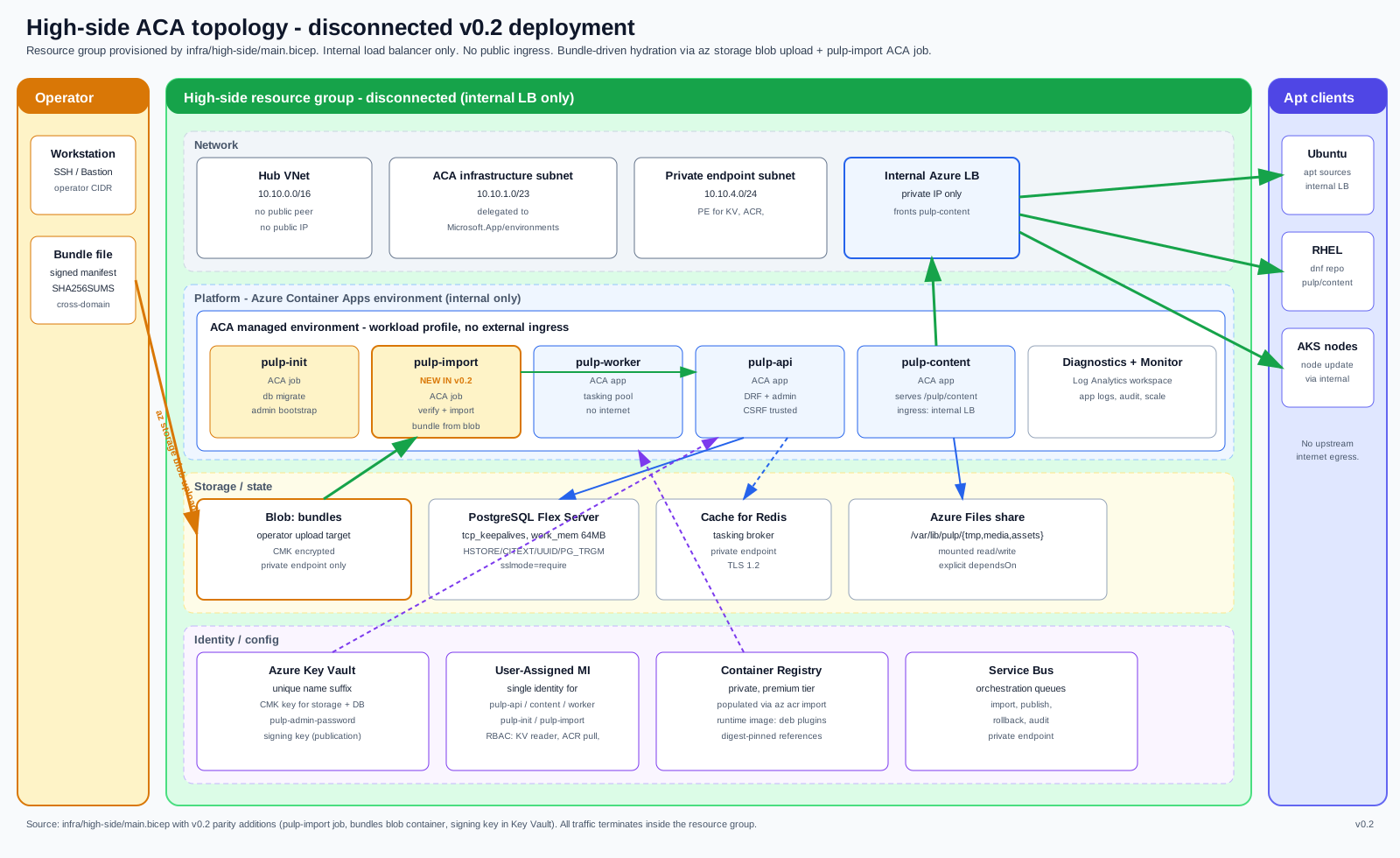
Both the connected low side and the disconnected high side run as Azure Container Apps environments backed by the same shared Bicep modules at infra/_shared/. This eliminates the VM-bootstrap path and makes the high side as reproducible as the low side.
Low-side vs. high-side parity
| Capability | Low side | High side |
|---|---|---|
| ACA environment | ✓ internal; content app has external ingress | ✓ internal-only (no external ingress at all) |
| Pulp API + content + worker apps | ✓ | ✓ |
Azure Files share at /var/lib/pulp |
✓ | ✓ |
| PostgreSQL Flex + Redis + Key Vault + ACR | ✓ | ✓ |
| Service Bus queues | ✓ | ✓ |
| ACR private endpoint | optional | required (only path in) |
pulp-reconcile ACA Job (syncs from upstream) |
✓ | — |
pulp-import ACA Job (ingests operator bundles) |
— | ✓ |
bundles Blob container (operator upload target) |
— | ✓ |
| Internet/upstream connectivity | ✓ | — (air-gapped) |
Single template, two clouds
Both infra/low-side/main.bicep and infra/high-side/main.bicep accept a cloudEnvironment parameter (public or usgovernment). Flipping it switches all privatelink DNS zones and endpoint suffixes without forking templates or runtime images.
Turnkey bootstrap model
A successful deployment should come online already prepared to serve the mission.
Platform bootstrap
These settings are typically configured through infrastructure or runtime environment settings:
- database connectivity
- Redis connectivity
- Blob-backed artifact storage
- service hostname and base URL
- TLS certificates
- authentication integration
- worker counts and scaling
- private networking and DNS
Content bootstrap
These should be automated against the Pulp API:
- create or update remotes for Ubuntu and Red Hat sources,
- create repositories by distro, version, and architecture,
- publish stable distributions,
- register exporters and import routines,
- configure cleanup and retention policies,
- on the high side, import the latest approved baseline if present.
Example bootstrap flow
- Deploy runtime infrastructure.
- Wait for Pulp health endpoints to become ready.
- Validate database, storage, and secrets.
- Apply service configuration.
- Create or reconcile remotes and repositories.
- Create distributions at stable internal URL paths.
- Run initial sync or baseline import.
- Publish content and mark the service ready.
Pulp API automation
The Pulp API is a strong fit for automation. The content lifecycle is naturally expressed as:
For low-to-high movement, the transfer flow extends to:
This is an important boundary: not all settings live in the API.
| Configuration type | Managed through |
|---|---|
| Service runtime settings, DB, cache, storage, hostname, TLS | environment, Helm values, or container config |
| Repo lifecycle objects, sync, publish, export, import | Pulp API |
Operating model
Baseline and delta
The solution should support two artifact shapes:
- baseline bundles for initial hydration or recovery,
- delta bundles for routine update movement.
The low side should compare the last exported version with the newest synced version and generate a diff manifest that makes the transfer event easy to reason about.
Publish and rollback
The high side should publish only validated imports and keep at least one previous known-good snapshot available for rollback.
Observability
Operational visibility should include:
- sync success or failure,
- pending import/export tasks,
- last published repo version,
- checksum validation status,
- bundle lineage and transfer history.
Security and compliance notes
This design should assume regulated-environment requirements from the start:
- use private networking and private endpoints wherever possible,
- protect Red Hat entitlement material in Key Vault,
- sign manifests and preserve hashes for every transfer bundle,
- capture enough metadata to support chain-of-custody evidence,
- document retention and cleanup policies for both content and logs,
- ensure repo consumers trust the internal publishing certificates and signing keys.
Initial document set
This folder contains the architecture documentation set:
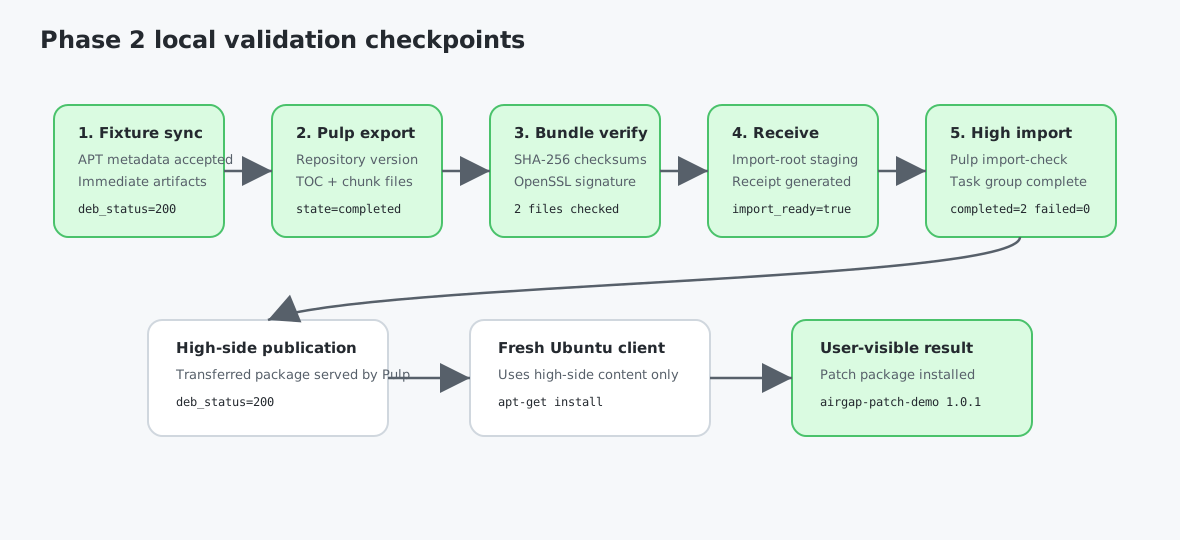
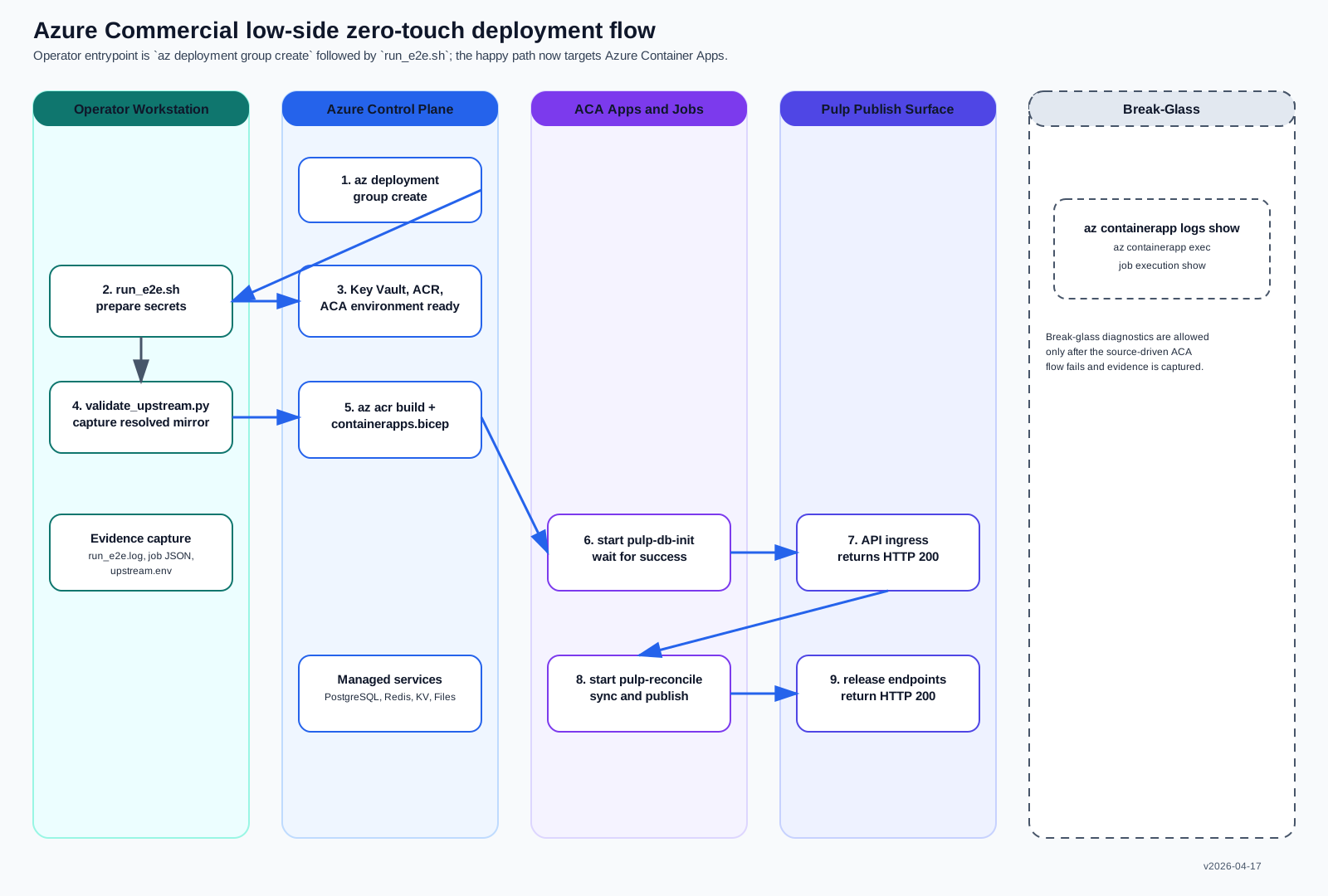
overview.md- architecture narrative and design intentdeployment-flow.svg- Azure Commercial low-side deployment flow from prep through export-ready handoffpulp-l2h-topology.svg- topology and component relationship viewpulp-l2h-lifecycle.svg- point-in-time export and hydration sequence viewazure-commercial-low-side-e2e.svg- operator deployment view for the Azure Commercial low-side validation pathphase2-operator-transfer-workflow.svg- Milestone 2 operator workflow from low-side export through high-side receive/importphase2-airgap-validation-flow.svg- Milestone 2 validation checkpoints proven during local two-Pulp E2E testinghigh-side-topology.svg- v0.2 high-side ACA disconnected topology (resource group, swimlanes, pulp-import job)bundle-import-flow.svg- bundle journey from low-side production through cross-domain transfer to high-side import../../DEPLOYMENT.md- end-to-end operator runbook for the Azure Commercial low-side deployment
Targeting Azure Commercial vs. Azure Government
Azure cloud selection (Commercial vs. Government) is a single Bicep parameter, not a
separate template. infra/low-side/main.bicep and infra/high-side/main.bicep both
expose cloudEnvironment (@allowed(['public','usgovernment']), default public).
Flipping it switches the privatelink DNS zone family (*.azure.com /
privatelink.azurecr.io ↔ *.usgovcloudapi.net / privatelink.azurecr.us),
the PostgreSQL Flex FQDN suffix, and Key Vault DNS — without forking templates,
modules, or runtime image. Adopters pick a sibling bicepparam
(main.public.example.bicepparam / main.usgovernment.example.bicepparam) or pass
--parameters cloudEnvironment=usgovernment inline. The bootstrap wrapper
(automation/bootstrap/run_e2e.sh --cloud usgovernment) calls az cloud set before
any az operation so all CLI traffic targets management.usgovcloudapi.net.
The operator-focused companion runbooks live under docs/runbooks/:
high-side-config.md- disconnected Azure hosting model and deployment ordertransfer-media.md- portable media workflow for Data Box or manual-drive transfer
Bundle ingest contract
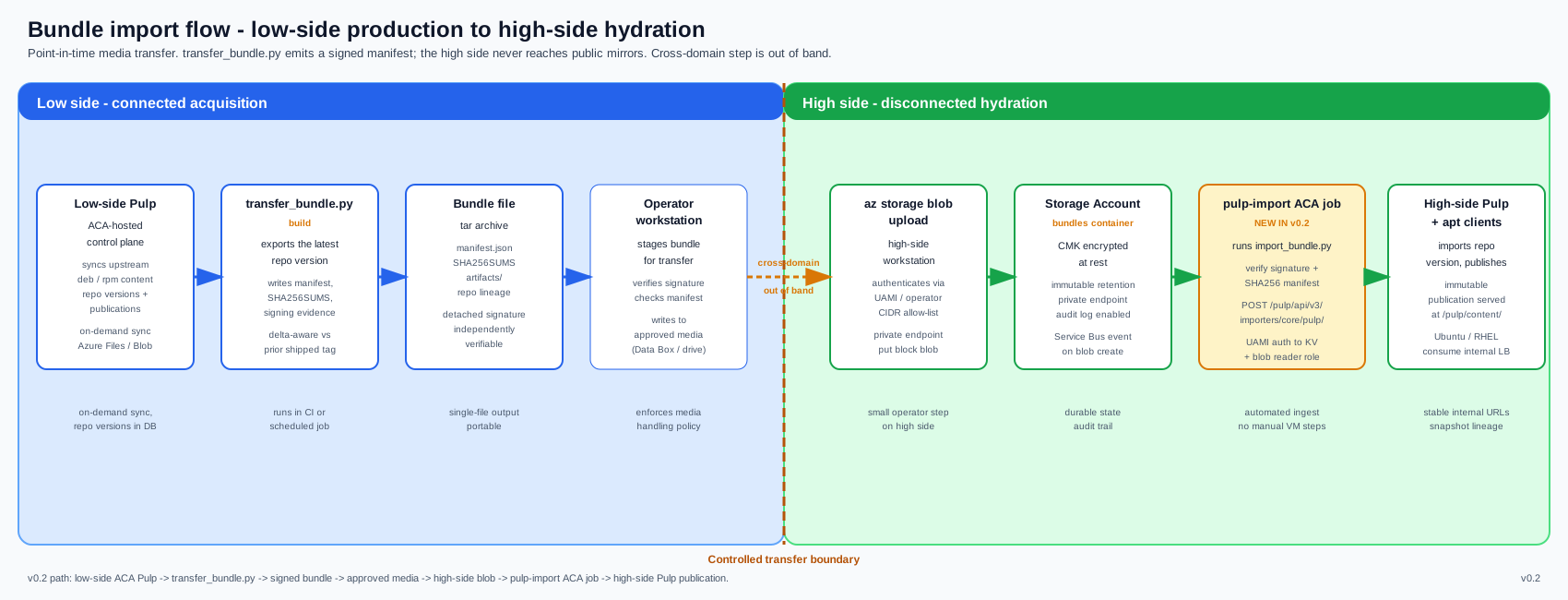
This is the end-to-end path a bundle follows from low-side production to high-side serving.
-
Build — low-side operator runs
transfer_bundle.py build, producing a signed, manifested.tarthat embeds the Pulp export tarball,transfer-manifest.json,SHA256SUMS, and an optional.sigfile. -
Transfer — the bundle moves across the air gap by whatever cross-domain mechanism the operator's organization mandates (USB, optical diode, approved file relay, etc.). This step is intentionally outside the accelerator's scope.
-
Upload — high-side operator uploads the bundle to the high-side Storage Account
bundlescontainer: -
Trigger — high-side operator starts the
pulp-importACA Job, passing the blob URL as an environment variable: -
Ingest — the job runs
run-pulp-import.sh, which callsimport_bundle.py --bundle-blob ...using the workload's managed identity:- Downloads the bundle to
/var/lib/pulp/imports/(the mounted Azure Files share). - Verifies bundle signature and
SHA256SUMS. POSTs to/pulp/api/v3/importers/core/pulp/to create the importer.POSTs to.../imports/to start the import task.- Polls the task to completion and prints a summary.
- Downloads the bundle to
-
Serve — imported repositories are immediately available at the high-side content app's APT/YUM URLs.
Azure Files share directories
Fresh Azure Files shares arrive empty. run-pulp-import.sh creates /var/lib/pulp/{tmp,media,assets,imports} before any Pulp command; do not skip this in custom entrypoints.
Source-of-truth mapping
| Component | File |
|---|---|
| Low-side ACA stack | infra/low-side/containerapps.bicep |
| High-side ACA stack | infra/high-side/containerapps.bicep |
| Shared Bicep modules (network, storage, DB, cache, KV, monitoring) | infra/_shared/ |
| Low-side params (Commercial + Gov) | infra/low-side/main.{public,usgovernment}.example.bicepparam |
| High-side params (Commercial + Gov) | infra/high-side/main.{public,usgovernment}.example.bicepparam |
| Pulp runtime image | runtime/container-apps/Dockerfile |
| Entrypoints (low + high) | runtime/container-apps/entrypoints/run-pulp-*.sh |
| Bundle build (low side) | automation/bootstrap/transfer_bundle.py |
| Bundle import (high side) | automation/bootstrap/import_bundle.py |
| Reconcile from upstream (low side) | automation/bootstrap/reconcile_pulp.py |
| One-command quickstarts | scripts/quickstart.sh, scripts/quickstart-high-side.sh |
Roadmap
Deferred work (additional distros, additional clouds, BYO Key Vault, RPM plugin support, and other icebox items) is tracked in ROADMAP.md. The architecture diagrams below reflect what ships today; the roadmap document is the single source of truth for what is planned.
Architecture diagrams
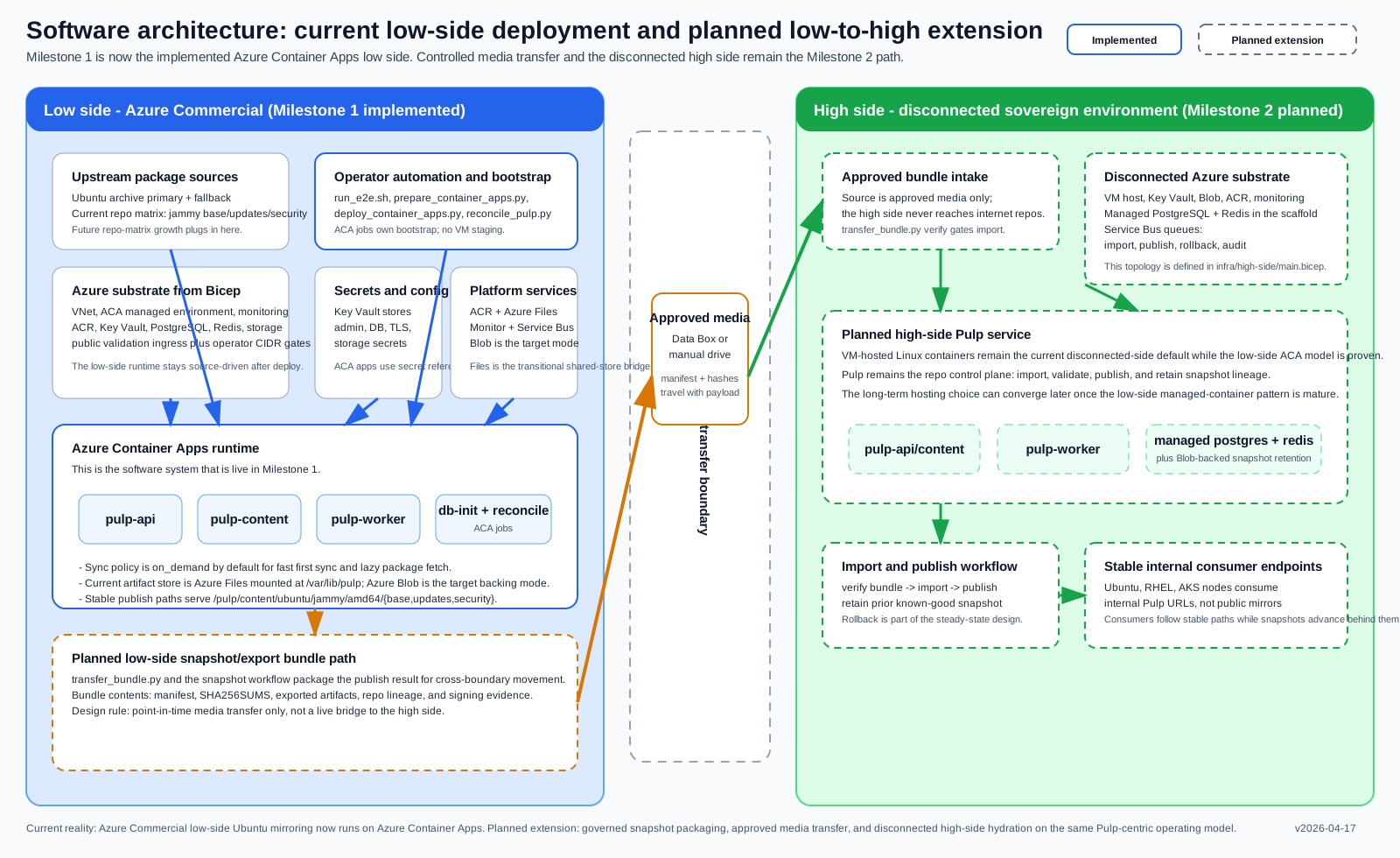
Topology
This topology view reflects the current repo state: both low side and high side run as Azure Container Apps-hosted Pulp control planes with managed PostgreSQL, managed Redis, Key Vault, ACR, and Azure Files shared mounts. The high side is internal-only with a dedicated pulp-import ACA job for bundle ingest; the low side includes a pulp-reconcile job for upstream sync.
Lifecycle

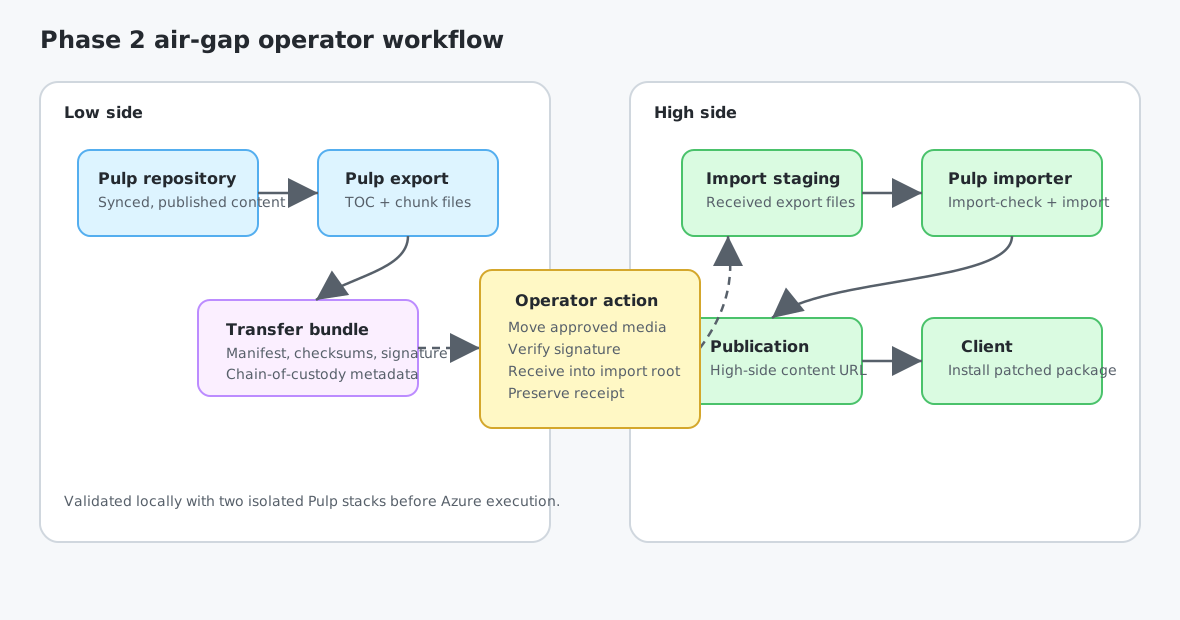
Phase 2 operator transfer workflow
Phase 2 air-gap validation flow
Azure Commercial low-side deployment
High-side ACA topology (v0.2)
This view shows the disconnected high-side resource group as provisioned by infra/high-side/main.bicep. The platform swimlane includes the pulp-import ACA job; the storage swimlane includes the operator-facing bundles blob container. All ingress terminates on the internal load balancer.